

Table of Contents
▼- How to Write a Graphic Designer Resume (Examples & Writing Guide)
- Choose the Right Resume Format
- Best Format Options
- Simple Layout Tips
- Must-Have Resume Sections
- Optional Sections
- How to Write Each Section
- a) Write a Strong Summary or Objective
- b) Write Better Work Experience Bullets
- c) Skills to Include
- d) Portfolio & Projects
- e) Education
- Design Tips for a Graphic Designer Resume
- Customise Your Resume for Each Job
- How to customise quickly:
- Common Mistakes to Avoid
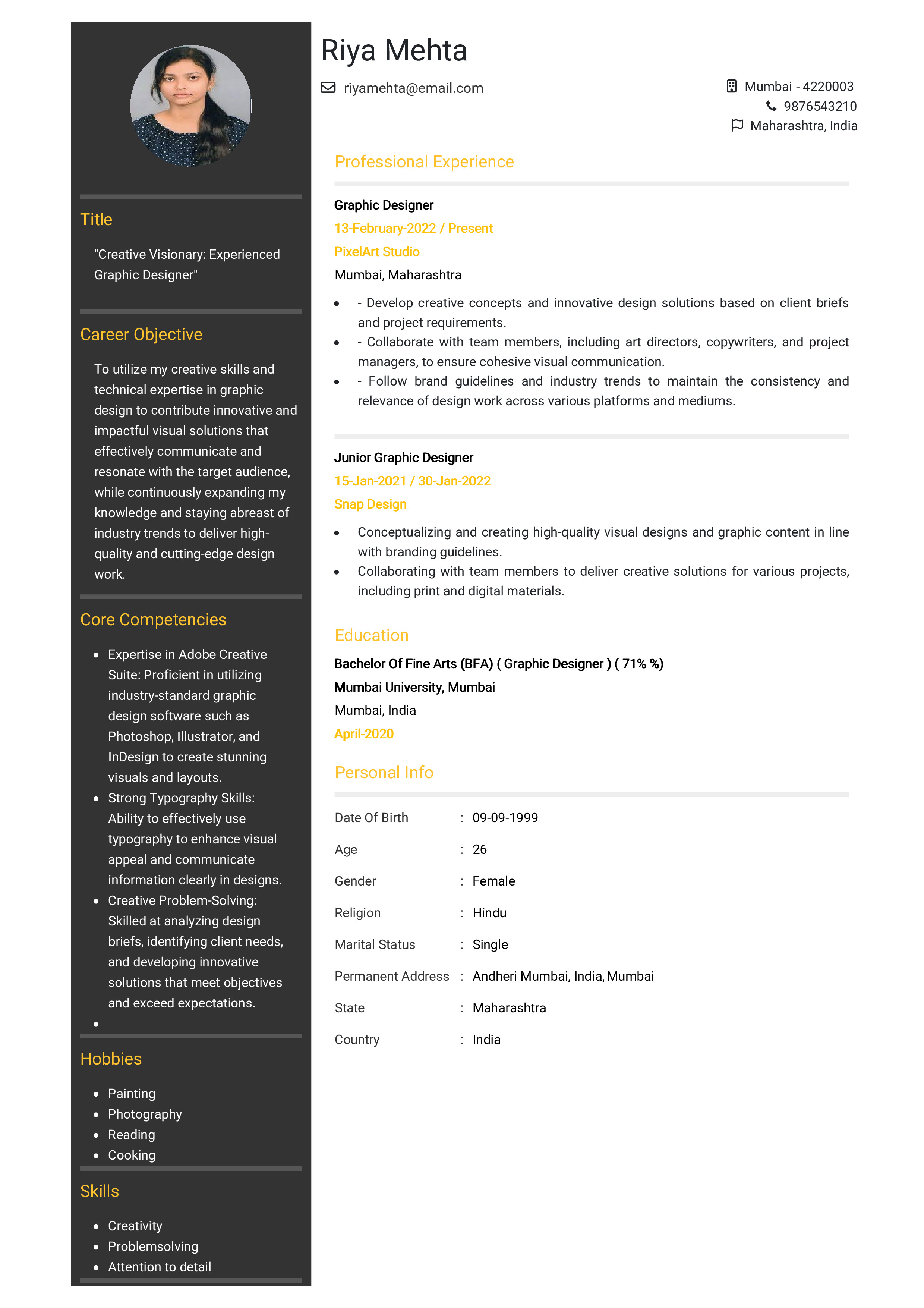
- Sample Simple Resume Layout
- Final Checklist
How to Write a Graphic Designer Resume (Examples & Writing Guide)
If you're trying to create a strong graphic designer resume but feel unsure where to start, don’t worry you’re not alone. Many designers know how to create beautiful visuals but struggle when it comes to writing about themselves.
This guide will help you understand exactly what to put in your resume, how to organise it, and how to make it both professional and easy to read. By the end, you’ll be able to create a resume that looks good and clearly shows why you’re a great designer.
Choose the Right Resume Format
A good resume starts with a clean and simple layout. You don’t need something overly fancy clarity is the most important.
Best Format Options
- Reverse-chronological (recommended): Lists your most recent job first.
- Functional: Focuses on skills (good for beginners).
- Combination: Mix of skills + experience (good for career changers).
Simple Layout Tips
- Use clear section headings.
- Keep margins and spacing neat.
- Use a simple, readable font.
- Stick to one page if possible.
Tip: It’s okay to show your design style, but don’t make the resume hard to read or too graphic-heavy.
Must-Have Resume Sections
Below is a quick table to help you understand what each section should include.
|
Section |
What to Add |
|
Contact Info |
Your name, phone, email, city, and a portfolio link (Behance, Dribbble, website). |
|
Summary or Objective |
2-4 lines describing who you are and what you offer. |
|
Work Experience |
Your previous design roles + achievements. |
|
Skills |
Design software, tools, and soft skills. |
|
Education |
Degree, school name, years. |
|
Portfolio / Projects |
Your top design pieces or case studies. |
Optional Sections
- Awards
- Certifications
- Languages
- Hobbies (only if relevant or creative)
How to Write Each Section
a) Write a Strong Summary or Objective
Use a Summary if you have experience:
Graphic Designer with 4+ years of experience in branding and digital design. Skilled in Adobe Creative Suite and visual storytelling. Passionate about creating clear, engaging designs that drive results.
Use an Objective if you’re a beginner:
Creative design graduate looking for an entry-level graphic design role. Skilled in layout design, colour theory, and Adobe Illustrator. Excited to grow my skills in a creative team.
b) Write Better Work Experience Bullets
Instead of listing duties, show what you achieved.
Weak:
Designed graphics for social media.
Strong:
Designed over 30 social media graphics each month, increasing engagement by 25%
Tips:
- Start each bullet with action words like designed, created, improved, or led.
- Add numbers if you can (projects completed, engagement increase, clients served).
- Keep bullets short and clear.
c) Skills to Include
Your skills section should be a mix of design software and professional abilities.
Hard Skills:
- Adobe Illustrator
- Photoshop
- InDesign
- Figma / Sketch
- Typography
- Branding
- UX/UI basics
- Print & digital design
Soft Skills:
- Creativity
- Time management
- Teamwork
- Communication
d) Portfolio & Projects
Your portfolio is one of the most important parts of your application.
Include:
- A clean link to your portfolio
- 2-3 top projects
- A short description (your role, tools used, final result)
Example Project:
- Branding for local bakery. Created new logo, colour palette, and packaging that helped improve their brand recognition.
e) Education
If you studied design, list your degree and school. If you’re still studying, simply write “In progress.”
Example:
Bachelor of Graphic Design
XYZ University | 2021–2024
You can also add:
- Key courses
- GPA (if strong)
- Design workshops or online courses
Design Tips for a Graphic Designer Resume
Since you’re a designer, your resume should look polished but not overly decorated.
Keep in mind:
- Use simple colours (one accent colour is enough).
- Stick to one or two fonts.
- Use plenty of white space.
- Avoid heavy graphics that might confuse resume-scanning software (ATS).
- Make sure your portfolio link is easy to find.
Customise Your Resume for Each Job
Many designers skip this step, but it makes a big difference.
How to customise quickly:
- Read the job description and match your skills to it.
- Highlight experience related to the role (branding, UI, print, etc.).
- Rearrange your skills so the most relevant appear first.
Common Mistakes to Avoid
- No portfolio link
- Too much text
- Too many colours or fonts
- Spelling mistakes
- Long paragraphs instead of clear bullet points
Sample Simple Resume Layout
[Your Name]
Graphic Designer
Phone | Email | Portfolio Link
Summary
Short 2-4 sentence summary about your experience and design strengths.
Skills
- Adobe Illustrator, Photoshop, InDesign
- Branding, Typography, Web Design
- Creativity, Communication, Time-Management
Experience
Graphic Designer – Company Name | Dates
- Designed marketing materials that increased engagement by 20%.
- Created logos, posters, and digital graphics for 10+ clients.
- Worked closely with the marketing team to improve brand consistency.
Education
BA in Graphic Design-University Name | Years
Projects
- Rebranding for XYZ: Created logo, colour palette, and brand guide.
- Website UI for ABC: Designed layout in Figma and improved usability.
Final Checklist
Before sending out your resume, make sure:
- Your contact details are correct.
- Your portfolio link works.
- Your summary is clear and short.
- Your experience includes achievements, not duties.
- Skills match the job description.
- The design is clean and easy to read.
- There are no typos.